
One paywall: 0.12%. The other: 5.5%. Same products.
October in Apphud: see which paywall earns, test several ideas on your best audience at once, and choose which paywall overlapping users see.

Most paywall problems don’t hide. They sit in a report nobody opened this week. This month’s update moves the numbers to where you already work, lets you test more than one idea on your best users at once, and helps you avoid calling a test or a campaign before users have had time to pay.
All of it is live on Apphud 2.0.
See which paywall makes you money, and which one loses it
Every paywall card in Mission Control now shows paywall views and conversion rate for the last 30 days, right next to its placements and product bundles.
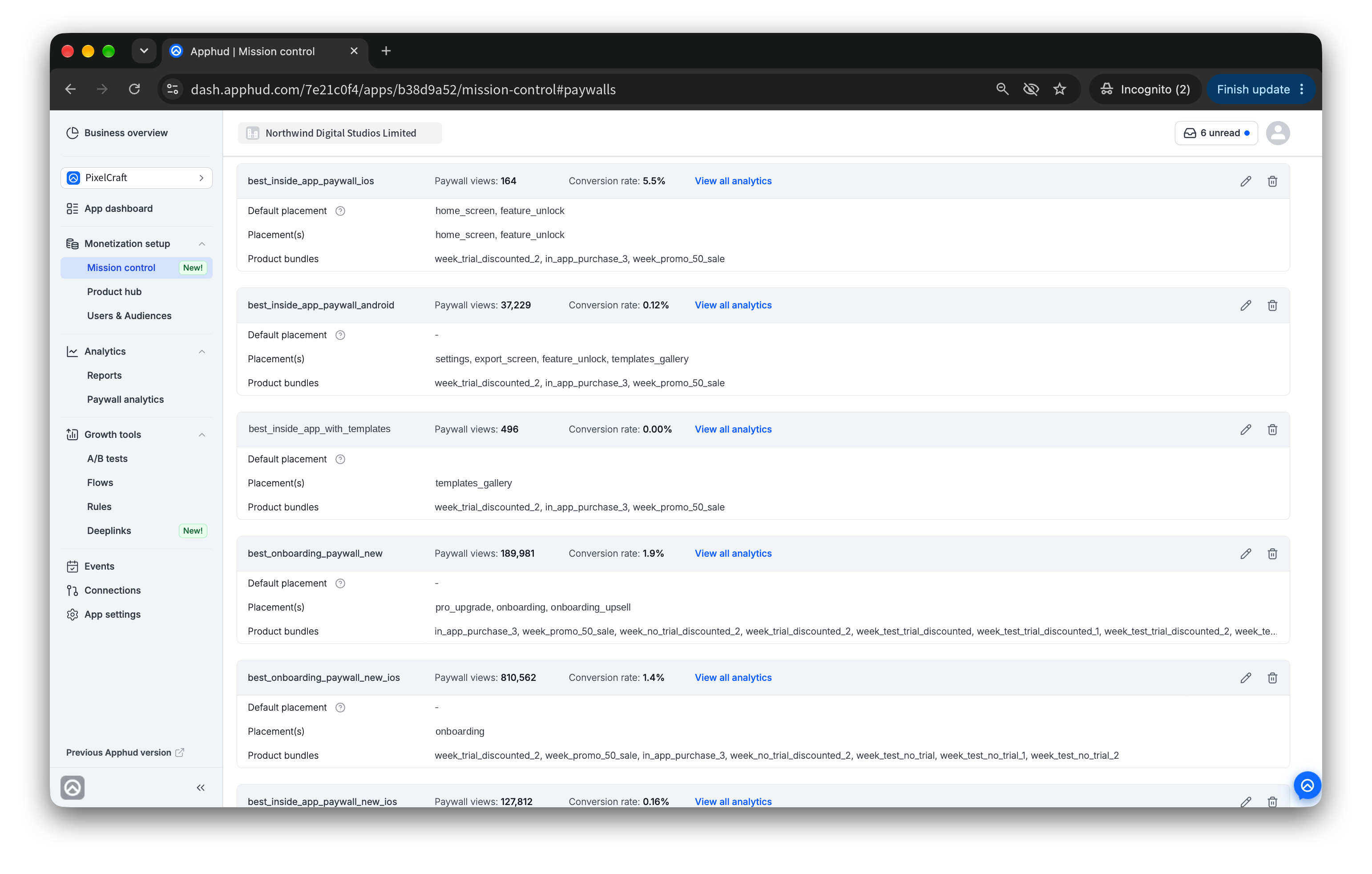 Your busiest paywall isn’t always your best one. Now you see both at a glance.
That changes what you notice. Take the list above: an in-app paywall on Android converts at 0.12% across 37,000 views. Another paywall, selling the same products, converts at 5.5%. Two onboarding paywalls sit side by side: the one 810,000 users saw converts at 1.4%, its sibling at 1.9%.
None of this was hidden before. It just took a report per paywall to find it. Now it takes a scroll.
A word on reading these numbers: 5.5% on 164 views is a signal, not a verdict. A dozen purchases either way moves it a lot. What the card tells you is where to look. It’s a candidate worth sending real traffic to, or putting into a test against the paywall that’s underperforming.
When you want the full picture, view all analytics on any card opens that paywall’s report, where you can segment, set the cohort period and filter.
Found a paywall worth testing? Your best audience can now run several tests at once
Your most valuable users usually sit in one audience: your Tier 1 countries or your highest-intent segment. Until now, that audience could run only one A/B test. If you were testing the onboarding paywall, the idea for the in-app paywall waited its turn, and while it waited, that paywall kept converting at the old rate.
Not anymore. You can now run several A/B tests on the same audience at the same time, each on its own placement with its own traffic split.
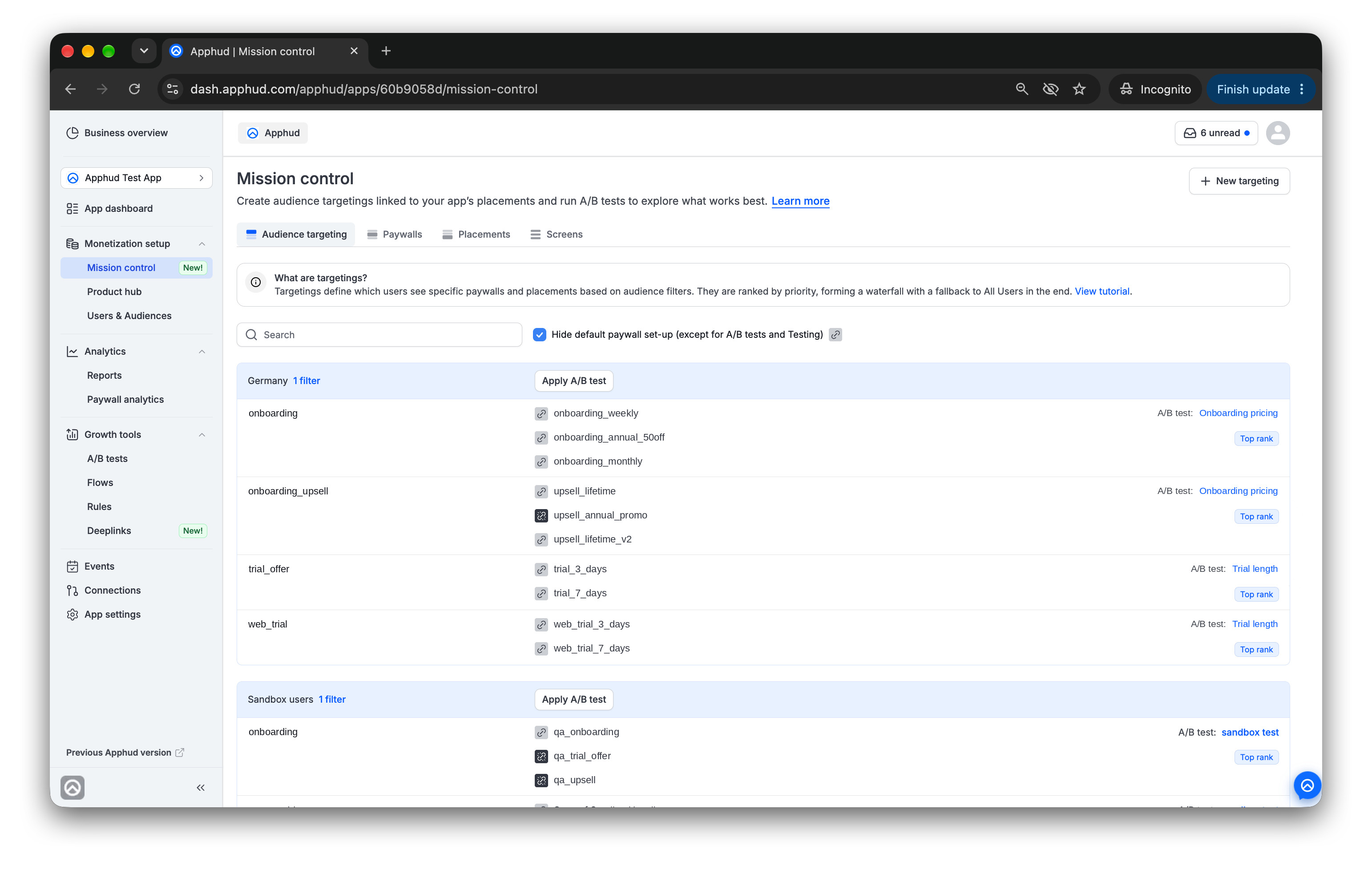 Multiple tests on one audience, each on its own placement.
How it works:
- Each test owns its placement. Start, adjust or stop one without touching the others.
- A user in the audience joins every test they qualify for. The app gets one merged set of placements, and every paywall view and purchase is credited to the test that owns the placement, so results stay clean.
- There’s no limit on the number of tests per audience, as long as no two tests share a placement and only one of them tests App remote config.
- It works on any SDK version. There’s no app update to ship.
The result is simple to put in money terms: same traffic, more answers, and the winning paywall goes live a full test cycle earlier.
More about running multiple tests on one targeting.
Targeting got faster to steer
The targeting list in Mission Control got three changes that let you act on what you see.
Drag to re-rank. A user can fit two or three audiences at once, and the audience ranked higher decides which paywall they get. Put the targeting with your best-converting offer, or your higher-priced plan, on top, and every overlapping user lands there. It used to be a settings change. Now it’s one drag.
Open audience filters in one click. Before you blame a paywall for a low conversion rate, check who’s actually in the audience that sees it. A paywall shown to the wrong users will look bad no matter how good it is.
See which test runs where. Each placement shows the A/B test running on it. Hover the test name for its launch date, audience size and users affected, so you know how much a test covers before you read its result.
Other improvements
- A/B tests: test all sandbox users. Send every sandbox user of the app to one variation with a single toggle, and still pin specific user IDs to their own variations.
- Paywalls: the Custom JSON limit is now 15,000 characters.
- Rules: promo offer screens are back. Create one from a template or pick an existing screen, and edit it right in the rule.
- Rules: Was read? in the rule logs now shows whether the rule’s in-app screen was shown, and N/A for rules without a screen.
- Users: clean up test data in one click. Delete all sandbox users removes every sandbox user of the app at once.
- Users: Admins and Owners can delete a production user who has no production subscriptions, right from the User page.
- Web payments: edit a connected Paddle account. Change its name, API key or client-side token in App settings → Web payments.
Not on Apphud 2.0 yet?
Paywall performance in Mission Control, parallel A/B tests and many more run only on Apphud 2.0. Your account is already set up: nothing to rebuild, nothing to re-import.
Thanks for building with us.
Apphud team