
Every cancellation is lost revenue. Now you can stop it on Apple’s screen
Subscribers tap "Cancel", and their revenue walks out. Ad links hide which one pays. Family Sharing drags your conversion down. This November fixes all three, and you'll want it on today.
We'll start where most subscription revenue quietly disappears: the cancellation screen. A subscriber who taps "Cancel" isn't always gone for good. Some think the price is too high, some want a different plan, some just forgot why they subscribed. Until now, you could win them back only after they'd cancelled, with a Rule, a push and a promo screen. Now you can answer them before the cancellation goes through, right on Apple's screen.
Keep the revenue that walks out at "Cancel"
Your offer, on Apple's cancellation screen, at the exact second a subscriber decides to leave.
Picture it. A subscriber opens Settings, finds your app and taps Cancel. Until now, you could only react afterwards: a Rule catches the cancellation and sends a push or shows a promo screen, if the user opens it. The moment of the decision itself, on Apple's screen, was out of your reach.
Now that screen has a "From the developer" section, and Apphud fills it with your offer. The subscriber who was about to leave sees a reason to stay, right there, before the cancellation goes through.
What you can put in front of them
- A discount on the plan they already have. A lower price beats no revenue at all.
- A plan that fits them better. For example, weekly → monthly with a free month, so they move within your app instead of out of it.
- A reason to stay. A short message with an image or up to five bullet points: what they'd lose, what's coming next.
Every subscriber gets the offer that fits them
Annual subscribers and weekly ones don't leave for the same reasons. Target each offer by audience with the same picker you use for A/B tests, choose which products it covers, and write it in every App Store language. Everyone else gets your default offer. When Apple asks what to show, Apphud picks the right one in real time.
You see exactly how much revenue it keeps
Every offer card shows Views, Activations and Revenue for the last 90 days. No more guessing whether a retention discount pays off: you see the money it saved. The customer timeline records a Retention offer shown event, so you know what each subscriber was offered.
Apple's review is on us
Every message needs Apple's approval. Apphud submits each offer the moment you save it, shows its status (Waiting for review, Rejected, Active, Inactive) and notifies the owner and admins when Apple decides. Edit a live offer, and subscribers keep seeing the approved version until the new one passes, so nothing ever stops working. Sandbox and production are separate, so you test before going live.
Live in three steps
- Ask Apple for Retention Messaging access for your app. The API is in pre-release, so access is on request.
- Add an App Store In-App Purchase key, with the issuer ID, to your app in Apphud.
- Paste your app's Retention Messaging URL from Apphud into App Store Connect. Set up sandbox first, pass Apple's performance test, then switch to production.
You'll find it in Rules → Apple retention messaging. It works on iOS and iPadOS 15.1+, macOS 14+ and visionOS 1+.
Every day without it, cancellations go unanswered. Retention offers are in beta and are turned on per company. Message us in the chat or email your account manager, and we'll switch them on and help with the setup.
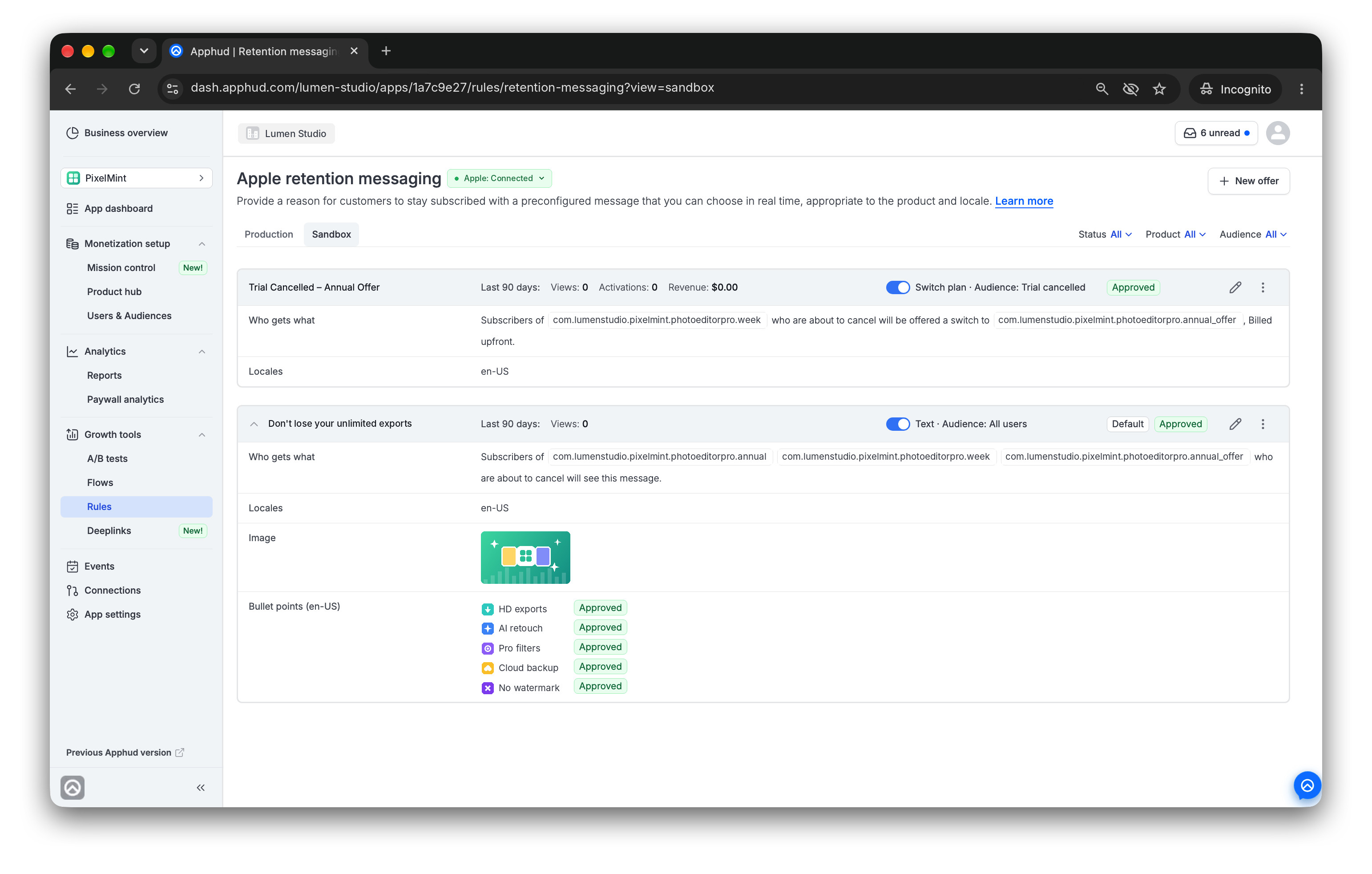 Rules → Apple retention messaging, offer cards with status and Views, Activations, Revenue
See which ad link pays, and give it its own paywall
Stop splitting budget between campaigns you can't tell apart.
And a deeplink isn’t tied to an ad network. Create a separate link for each blogger and send it to them, turn one into a QR code for a poster or packaging, or drop one into a newsletter. Everyone who installs through it is counted under that link. So a blogger’s post or a poster in the subway shows up in your reports with its own users and revenue, right next to your Meta and TikTok campaigns. Add the LTV prediction, and you see which link will pay off long before the revenue comes in.
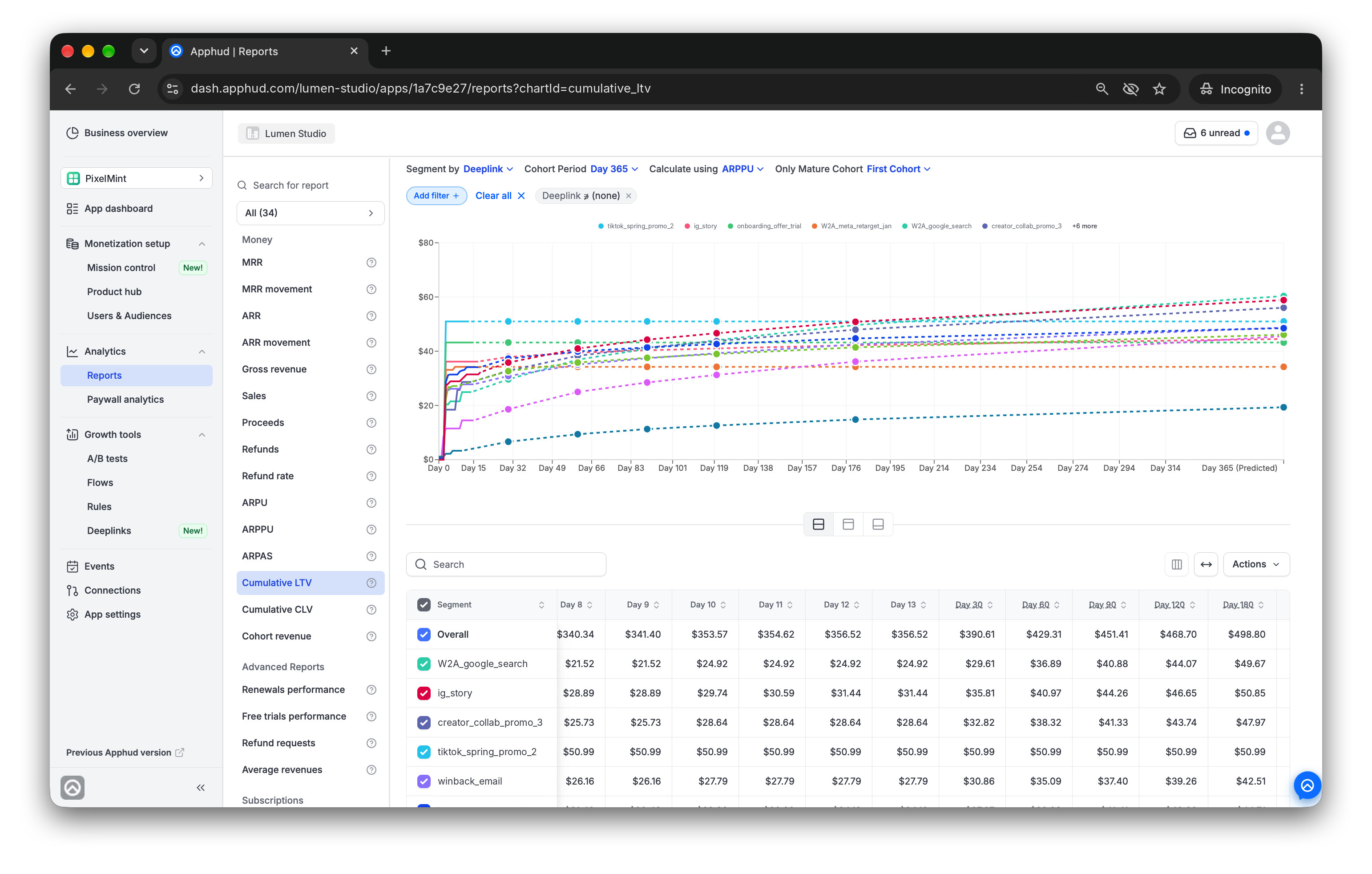 Predicted LTV by Deeplink: see which link pays off before the revenue comes in.
Revenue per link, side by side
Filter and segment your reports by Deeplink to compare the users and revenue of each link. Reports show link names, not IDs, so you read them at a glance. Then move budget to the link that actually earns.
A paywall that matches the ad
Add a Deeplink filter to an audience, and people who arrive from that link see the paywall you chose for it. An influencer's followers land on the offer the influencer promised. A seasonal campaign lands on the seasonal price. The promise in the ad and the price on the screen finally match.
No more lost late installs
Not everyone installs right after the click. The new Optimal extended match accuracy counts clicks made up to 1 hour before the install, with the same accuracy as Optimal (which counts 5 minutes). Turn it on in Deeplinks → Config → Match accuracy.
👉 Set up deeplinks for your campaigns
Apphud for iOS 3.0: know where every metric is heading, from your phone
A revenue dip doesn't wait until you're back at your laptop.
Revenue dropped overnight? A trial campaign took off on the weekend? The rebuilt Apphud app shows it on your phone, with enough context to tell whether it's worth acting on right now.
- The trend, not just the number. Trend lines on every metric card show where a number is heading, not only where it is today.
- Compare in one tap. Pick any date range and see each metric next to the previous period of the same length. Change percentages are now always calculated against that period, so they're more accurate.
- Your business at a glance. A headline metric, ring gauges, cards grouped by topic and a revenue chart, plus a detail screen for every metric.
- Faster and safer. Data loads faster and more reliably, your session is stored more securely on the device, and dark mode works on every screen.
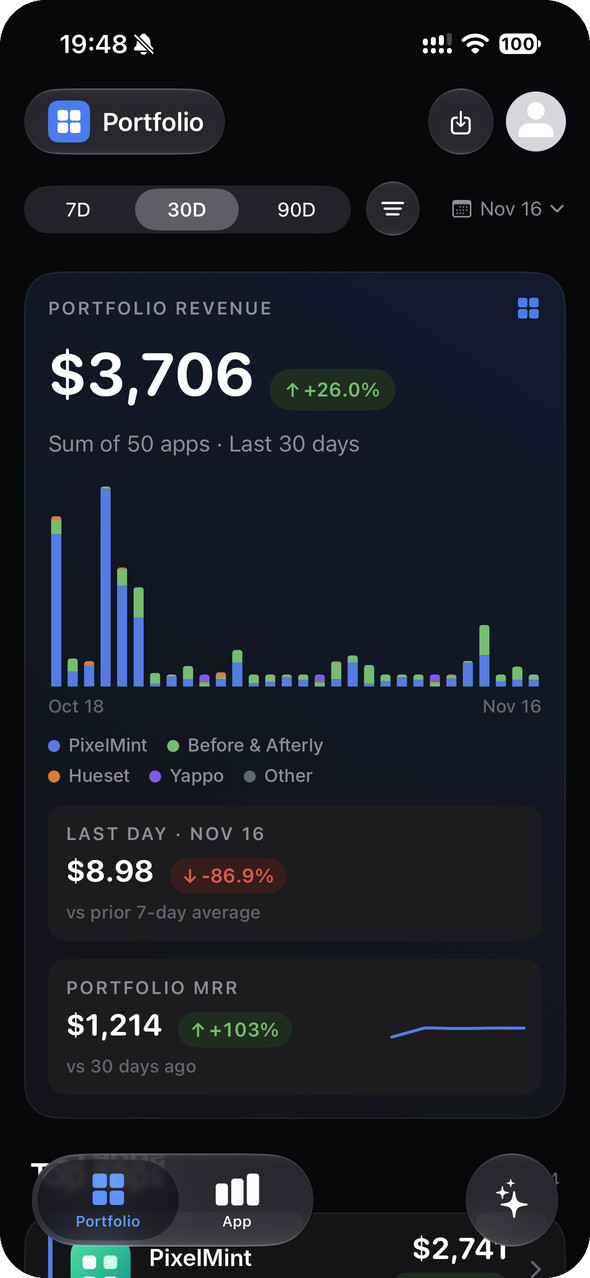 Your whole portfolio on one screen
Family Sharing was pulling your conversion down. Not anymore.
Your paywalls were converting better than your dashboard said.
Here's what was happening. When someone shares a subscription with their family, the App Store reports every family member to Apphud, even the ones who never opened your app. They landed in New users, never saw a paywall and could never have paid. And every install-to-trial and install-to-paid rate you looked at was diluted by them.
So you may have been judging your paywalls, and making decisions about them, on numbers that were lower than reality.
Now your conversion counts only people who could actually convert
Anonymous Family Sharing users are out of New users, install-to-trial and install-to-paid conversion, ARPU and the other user-based charts and widgets. A family member who does open your app is a regular user and counts as before. Nothing is hidden: the Users list still shows everyone, and the Anonymous filter finds these records.
Open your dashboard and look again. If many of your subscribers share their plan, New users will go down and conversion will go up. It works on its own, no settings to change.
👉 See how New users are counted
Small things that save time every week
- Paste A/B test results straight into a spreadsheet. Actions → Copy to clipboard above the results table copies it as you see it: visible columns, expanded segments, Effect, p-value, Total. Requires the Data export permission.
- See where a metric is going. A dotted trend line on line charts in the Charts tab shows the direction over the selected period, and incomplete periods don't skew it.
- A declined card no longer blocks a payment. If your default card is declined on an overdue invoice, pay with another saved card right in the dashboard, bank confirmation included. Your default card stays the same.
- Know who changed what. Admins and Owners can see who changed an integration or a store setting, what changed and when.
Thanks for building with us, more coming soon!